Forgot something?Add more parts to your collection for another {{ combine.minutesRemaining }} {{ combine.minutesRemaining === 1 ? 'minute' : 'minutes' }}.
Add more parts with no extra shippingfor another {{ combine.minutesRemaining }} {{ combine.minutesRemaining === 1 ? 'minute' : 'minutes' }}.before {{ combine.deadlineTimeLabel }}.
Have a number on a brick, in your instructions or on a box? Find out what it identifies, where to search and how to check you have the right replacement.
Use a design number to find the shape. Use an element number to narrow down the version and colour.
A set number identifies the whole model. Whichever number you start with, compare the resulting part's shape, colour and decoration before ordering.
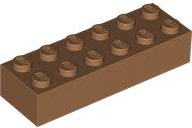
The same Medium Nougat catalogue variant, listed under another element reference.
The example product lists both element IDs. Different element numbers do not automatically mean you need different pieces: compare the design, colour, decoration and any mould requirement in your parts list.
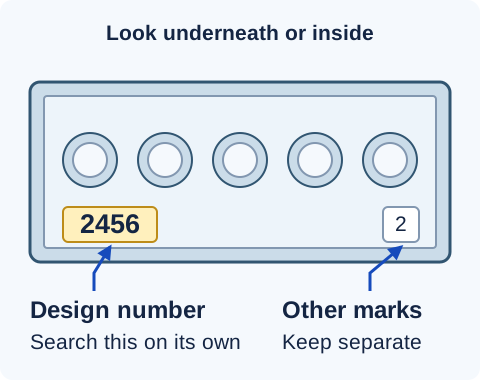
Turn the piece over and inspect the underside, inner walls and recessed surfaces. A moulded design number can be tiny. Shine a light across the surface, or take a close-up photograph and zoom in.
Illustrated underside: look for a design number and keep other mould marks separate. Marking positions and details vary between pieces and moulds.
Copy the candidate design number. Keep it separate from other small numbers or symbols on the piece.
Search it and compare the shape. Check the stud layout, height, underside and connections. If it finds the wrong shape, recheck the marking.
Choose the colour and decoration. A number moulded into the base shape may not distinguish a particular print.
No readable marking? Describe the family, dimensions and connection detail, such as brick 2 x 6 or plate with clip. The visual guide to part types helps you build a useful description.
Read an entry in the instructions
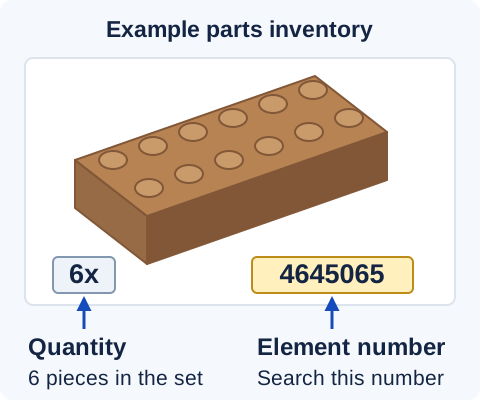
Find the picture of the missing piece in the parts inventory, usually near the back of newer booklets. Copy its element number and keep the image as a cross-check.
Illustrated inventory entry: 6x is a quantity; 4645065 is the element number. Inventory layouts vary. This example shows how to read an entry, rather than the inventory of a particular set.
Search 4645065, then confirm the matched description, selected colour and image. Our catalogue accepts element numbers and design numbers. Check that enough are available for the quantity still missing from your model.
Count what is missing
The inventory quantity is the set's total.
If the inventory says six and you already have five, buy one replacement. Keep the number you search separate from the quantity you order.
Only have the set number?
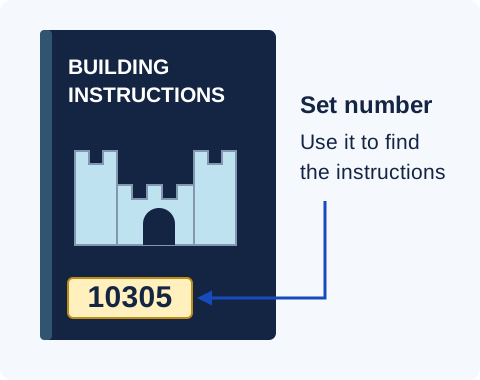
Look on the box or the front of the instruction booklet. Use the set number to find the instructions, then identify the individual piece in the inventory.
Illustrated cover: the set number identifies the whole model. Use the parts inventory inside to identify an individual piece.
Find your set's building instructions. Keep the set number and a picture of the required piece with your shopping list, especially when a printed or specialised part is hard to distinguish.
What to do when the result does not look right
Nothing is found
Recheck the digits and remove accidentally copied spaces. Try a design number in place of an unrecognised element number, or search by shape and dimensions. An empty search alone does not establish that the piece was never made.
Right shape, wrong colour
A design-number search can lead to several colours. Choose the exact colour required. If you searched an element number, compare it with the original inventory and check the listing's element references.
Right shape, wrong print
You may have found the underlying plain design. Compare the decoration, including faces, lettering and patterns. For minifigure components, check the back as well as the front.
The numbers differ
First check whether you are comparing a design number with an element number. A catalogue variant can also list multiple element IDs, as the paired example shows. Follow any exact mould or variant requirement in the set or designer's parts list.
Found the exact piece but not enough stock? Check the available new and pre-loved quantities against the number you need. A stock shortage is a different problem from an identifier the catalogue does not recognise.
Before adding it to your order
Confirm the match. Compare the shape, dimensions, connections, colour and any decoration. Check the underside when mould differences matter.
Check availability. Choose the quantity still missing from your model and confirm it is available.
Keep the reference. Save the original number, product description, colour and required quantity so you can retrace the match later.
If the colour names differ between your instructions and a listing, use the colour-matching guide. For a complete custom-build inventory, the MOC buying guide explains uploading a parts list.
Common questions
Why is the number underneath my brick different from the booklet?
The brick may show a design number while the inventory shows an element number. Compare the resulting design and colour. In the worked example, design 2456 and element 4645065 both help identify the same Medium Nougat brick.
Does a design number identify the colour?
No. The same design can be made in several colours. Use an element number, a known set inventory or a piece of known colour to complete the identification.
Can I identify a printed piece from the number underneath it?
That marking may identify the base shape without distinguishing its decoration. Compare the decorated listing's image and description, including small differences in printing.
Can I tell the identifier type by how many digits it has?
Use where you found it as the stronger clue. Number formats vary. A number on a box, a number moulded into a piece and a number beside an inventory picture serve different purposes.
Your next piece
Put your parts list to work.
Search genuine LEGO parts by number or description, then choose your colour and condition.